


The Joint Admissions and Matriculation Board (JAMB) has reportedly commenced sending SMS notifications to 2026 UTME candidates who are yet to accept or reject their admission offers.
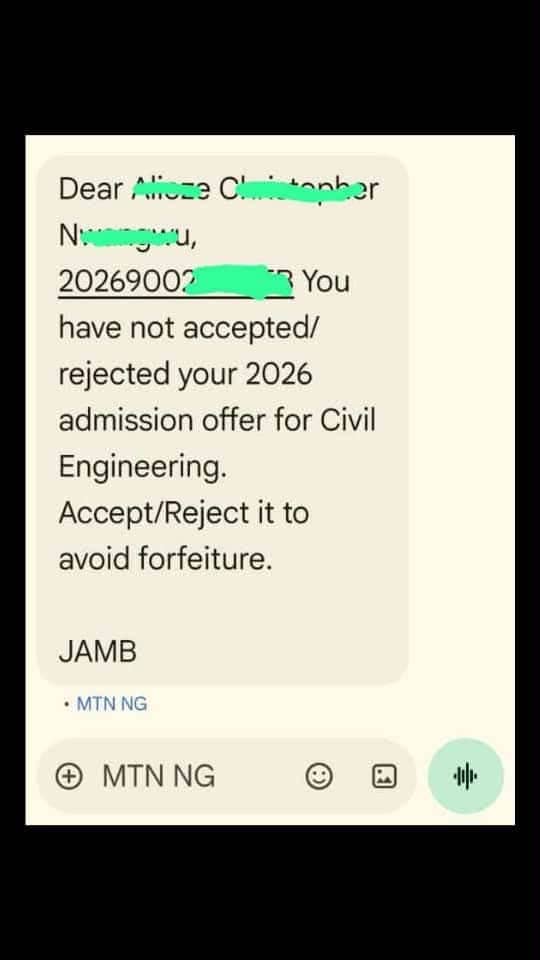
A message circulating from JAMB, received through an MTN Nigeria phone number, informs a candidate that their 2026 admission offer has not been accepted or rejected. The notification further urges the candidate to respond through the appropriate channel to avoid forfeiting the admission offer.
The development serves as a reminder to candidates who have been offered admission for the 2026/2027 academic session to check their admission status and take the necessary action on the JAMB Central Admissions Processing System (CAPS).
What Does the JAMB SMS Mean?
The SMS notification indicates that the candidate has an admission offer but has not yet responded by accepting or rejecting it.
Candidates who receive similar messages are advised to log in to their JAMB CAPS profiles to confirm the admission offer and check their current admission status.
It is important to verify the information directly on the official JAMB platform rather than relying solely on an SMS notification.
What Candidates Should Do
All 2026 UTME candidates, particularly those who have received admission offers, are advised to take the following steps:
- Check your SMS notifications: Regularly check the phone number used during JAMB registration for important admission-related messages.
- Log in to JAMB CAPS: Visit the official JAMB e-Facility portal to access your CAPS profile.
- Check your admission status: Confirm whether you have been offered admission by your preferred institution or another institution.
- Accept or reject the offer: If an admission offer is available, carefully review the details and respond accordingly through the approved JAMB platform.
- Confirm your response: Ensure that your decision is successfully reflected on your CAPS profile.
How to Accept or Reject Admission on JAMB CAPS
Candidates can follow these steps to check and respond to their admission offers:
- Visit the official JAMB e-Facility portal
- Log in using your registered email address and password.
- Navigate to the Check Admission Status section.
- Select Access my CAPS.
- Click on Admission Status to view your admission offer.
- If an offer is available, select the appropriate option to accept or reject it.
Candidates should ensure they are using the official JAMB portal when carrying out admission-related activities.
Important Notice to 2026 UTME Candidates
Candidates are strongly advised not to leave their admission offers unattended. Where an admission offer has been made, they should check their CAPS profiles and respond within the applicable timeframe.
Receiving an SMS should also prompt candidates to verify their admission status directly on JAMB CAPS. Those who have not received a message should equally check their profiles regularly for updates.
Have you checked your JAMB CAPS today? Do not leave your admission status unattended.

Join Our Community
Stay ahead with exclusive campus news, admission updates, scholarships and student opportunities.
You May Also Like
More

Be the first to comment